
Free resume template
Most free resume templates are designed to look striking. Many of them use columns, tables, icons, and text boxes that look fine to a person and come out scrambled when an applicant tracking system reads them. This template is deliberately plain: one column, standard section names, and nothing likely to trip up a parser. It is built to be easy for most hiring software to read. The work it leaves you is the part that matters, which is what you write in each section.
Free template
A plain, one column resume in Word format with standard section names and no tables or text boxes, so it is built to be easy for hiring software and people to read.
Download the free resume template (Word)Download the filled example
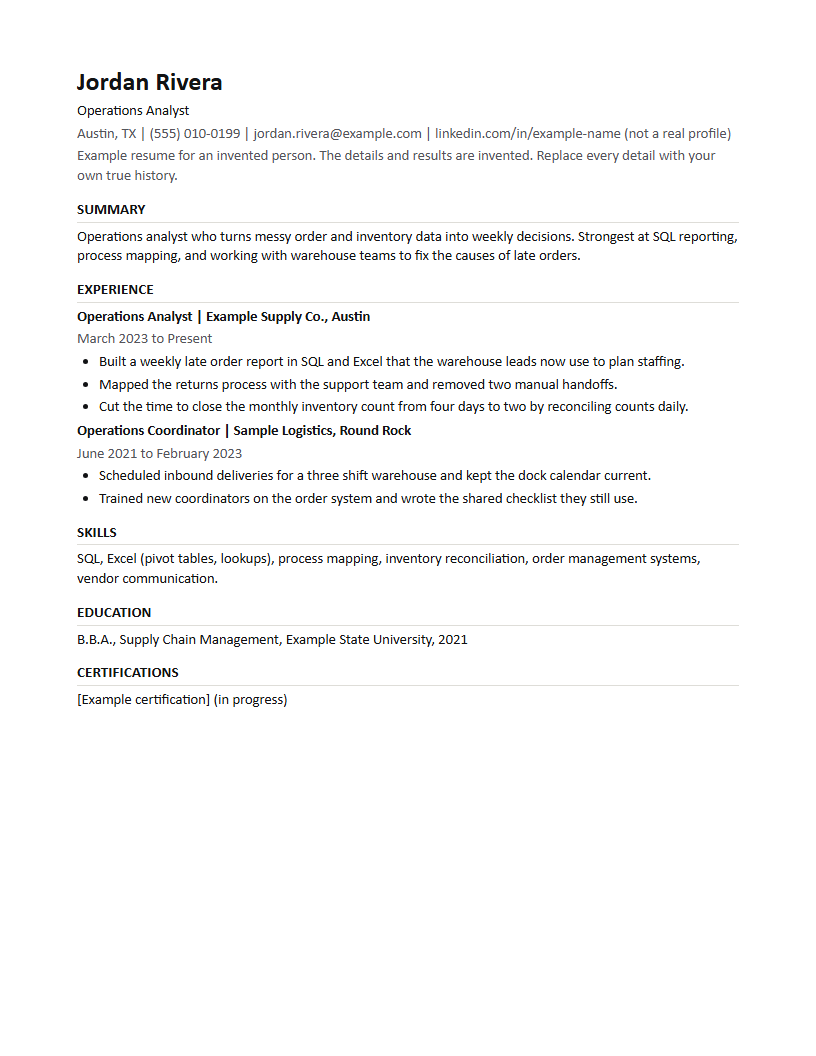
Open it in Word, or in Google Docs choose File, then Open, then Upload. Replace every bracketed line, then delete any section you do not need.
Why plain beats pretty
Many employers run applications through software that pulls your name, titles, dates, and skills into fields before a person reads anything. Layouts with columns, tables, or text boxes can put those pieces out of order, so your most recent job may land under the wrong employer or disappear.
A single column with ordinary headings reads in one order for software and people alike. It also prints cleanly and survives being pasted into a form, which you will do more often than you expect.
The top of the page does most of the work
A reader decides quickly whether your resume matches the job in front of them. Put a headline under your name, either your current title or the role you are targeting, clearly as a target and never as a title you held, then a short summary in the posting's words where they are true for you.
If someone saw only the top third of the page, they should still be able to guess the job you want. If they could not, rewrite the top before you touch anything else.
Experience written as results
Each bullet should say what you did, how you did it, and what changed because of it. Start with a verb. Name the tool or method where it matters to the role. Leave out duties anyone in the job would have, and keep the ones that show how well you did it.
Never add a responsibility, a number, or a title you cannot explain in an interview. The template gives you three bullets per role as a guide, not a quota.
Skills and education
List skills you could discuss for a few minutes without notes, in the words the posting uses where they are accurate. Avoid skill bars and percentages, which many systems cannot read and people tend not to trust.
Education and certifications go near the end unless the job requires a specific credential, in which case move them up. Delete any section that does not help you for this role. A shorter resume where every line supports the job reads better than a longer one padded with things the reader has to skip.
One template, many versions
Keep one true master copy, then save a version for each posting with its emphasis adjusted. Name each file for the company and role so you always know which version an employer saw.
The order of bullets and the summary change from version to version. Your employers, dates, degrees, and titles never do. Keeping that line firm is what lets you tailor quickly without ever having to remember which version said what.
Fill in the template
Download and open it
Open the file in Word, or upload it to Google Docs.
Write the top for the job you want
A headline under your name, then a short summary in the posting's words.
Replace each bracketed line
Results first, true details only, and delete any bracket you do not use.
Trim to what this job needs
Remove sections and bullets that do not support this role.
Save a version per posting
Name the file for the company and role, and keep your master copy unchanged.
The template as text
The same template you can download, written out so you can copy it straight into any document. Replace every bracketed part.
Header
[Your Name] [Headline: your current title, or the role you are targeting] [City, State] | [phone] | [email] | [LinkedIn or portfolio link]
Summary
[Two or three lines: the role you do, the kind of work you are strongest at, and one result you can talk about. Use the posting's words where they are true for you.]
Experience
[Job title] | [Company], [City] [Month Year] to [Month Year or Present] • [What you did, the tool or method, and the result. Start with a verb.] • [A second accomplishment that matches a duty in the posting.] • [A third, only if it is true and relevant.]
Skills, education, and extras
SKILLS [Skill], [Skill], [Tool], [Tool], [Method] EDUCATION [Degree or certificate], [School], [Year] PROJECTS (optional) [A project with what you built and what it did] CERTIFICATIONS (optional) [Certification], [Issuer], [Year]
Related reading
Questions
- Is this resume template friendly to applicant tracking systems?
- It is built to be easy for software to read: one column, standard headings, no tables, no text boxes, and no images. How a particular employer's system ranks you still depends on what you write.
- Can I use it in Google Docs?
- Yes. In Google Docs choose File, then Open, then Upload, and pick the downloaded file, or drag it into Google Drive and open it with Google Docs. Check the layout once it opens, especially the spacing between sections.
- Should I send it as a PDF or a Word file?
- Send what the application asks for. If it does not say, a Word file or a PDF made from text, not a scan, are both safe choices, and many systems read Word files reliably.
- Should my resume fit on one page?
- Keep it as short as your relevant experience allows. Early in a career, one page is usually enough. With more relevant history, a second page is fine, as long as the first page tells the reader which job you want and why you fit it.
Where ApplyASAP fits
If keeping a version of this template for every posting is the slow part, ApplyASAP prepares one for each job from your real history and the team sends the application.
ApplyASAP is one option when you want the sending done for you. It finds openings for the titles and places you name, tailors your resume to each posting, and does not invent employers, dates, degrees, titles, numbers, certifications, or people you managed. It answers the application questions, and the team sends and tracks each application. Skills it adds are ones your role and level usually carry, and you can take any of them off. The resume still has to be true.
Want to see how one resume lines up with one posting? Try the free resume keyword checker. It runs in your browser and saves nothing.